Case study
GainSafe: Building a Warehouse Safety Inspection App That Teams Actually Use
Warehouse Safety Inspection App
Client
UK warehouse / safety client
Role
Lead mobile engineer — iOS inspection workflows and local-first data
Timeline
Built from scratch through App Store release
Platform
iOS (iPhone & iPad)
Framework
Swift + Realm DB
Category
Safety & Compliance / Field Operations / B2B
Pass/Fail
One-tap checklist items
Offline
Realm local-first sync
iPhone + iPad
Adaptive layouts
Product tour
Drag or swipe through the camera scan, result, care, disease, and pest flows.
In-app screens · iPhone
Drag or swipe to browse screens
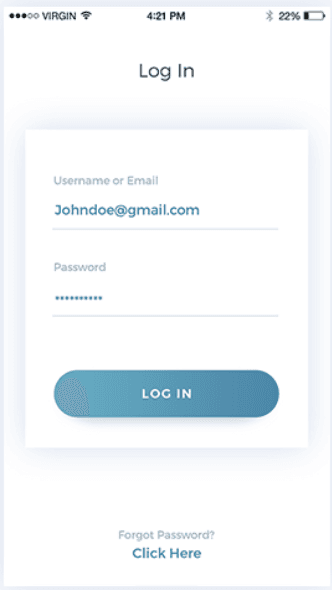
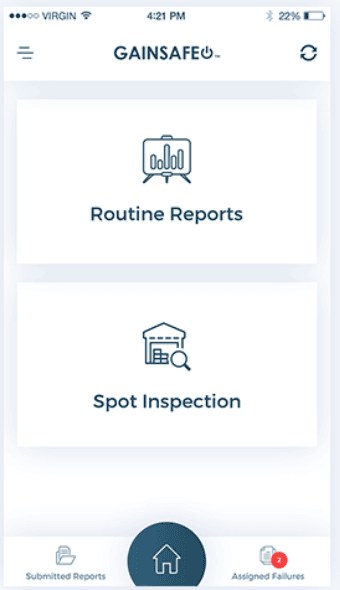
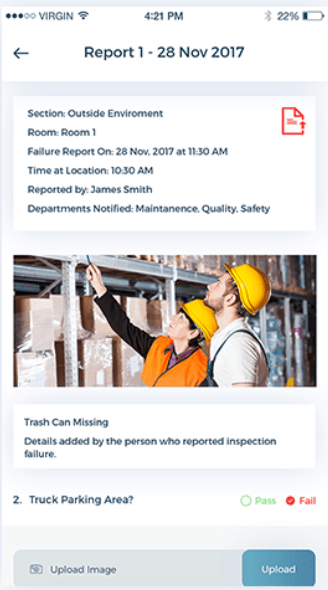
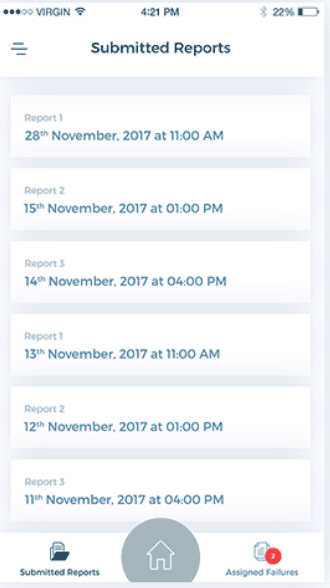
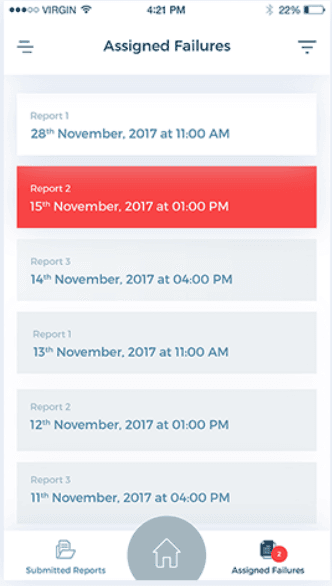
App tour — login, home (routine reports / spot inspection), issue report with photo evidence, submitted reports, and assigned failures.
Overview
Warehouse inspections have a reputation problem. On paper, they're mandatory. In practice, they're often rushed, inconsistently documented, and completed on paper forms that end up in a drawer instead of informing any real decision. By the time an issue on a checklist actually gets addressed, it's usually because something already went wrong.
GainSafe was built to fix that gap between "inspection happened" and "issue actually got fixed." It's a warehouse inspection app that makes it simple to run structured safety checks, automatically flags issues in a clear report, and turns inspection data into something operations teams can actually use — not just a compliance checkbox.
The problem
Talking to warehouse operations teams before building GainSafe surfaced the same frustrations repeatedly. The real problem wasn't a lack of inspections — it was that the process generated paperwork instead of usable insight.
- Paper-based inspection forms were slow to complete and easy to fill out carelessly under time pressure
- Issues identified during an inspection often didn't reach the right person in time to act
- No easy way to see patterns over time — the same issue in the same area every month
- Compliance documentation existed, but proving it during an audit meant digging through cabinets or scattered spreadsheets
- Inspections felt like a box-ticking exercise rather than something that improved day-to-day safety
Designing Around "Simple and Complete"
Structured checklists, not blank forms
Inspectors work from pre-built, customizable checklist templates — routine reports and spot inspections — rather than free-form notes from memory.
Issue flagging built into the flow
When something fails a check, the app prompts for a photo and short description right there — pass/fail on the item, evidence in context, not a follow-up form later.
Reports generated automatically
A completed inspection produces shareable, audit-ready documentation — submitted reports history, assigned failures with badge counts, and exportable failure details — without manual compilation afterward.
Architecture & tech stack
GainSafe is a local-first Swift app centered on Realm storage so floor inspections never depend on warehouse WiFi. Home surfaces the two primary paths — Routine Reports and Spot Inspection — with Submitted Reports and Assigned Failures always one tap away. Checklist items use single-tap Pass/Fail; Fail opens evidence capture (photo + note) and stamps metadata (section, room, reporter, departments notified, time at location). Completed work lands in submitted history; open failures stay in an assigned queue with badges so managers see unfinished work without hunting through PDFs.
| Category | Tools / tech |
|---|---|
| Mobile framework | Native Swift for iPhone and iPad (adaptive layouts) |
| Local database | Realm DB for offline-first inspection data and device storage |
| Offline support | Inspections completed and saved locally in warehouse dead zones, syncing when connectivity returns |
| Reporting | Structured compliance reports from completed checklists, with photo evidence and failure metadata |
| Photo / evidence | In-app camera upload tied to checklist items (e.g. fail + image + note on the same screen) |
| Issue routing | Assigned failures queue with notification badges so open issues stay visible after the walkthrough |
| Distribution | Shipped to the App Store · product site at mygainsafe.com |
Key features
Structured, customizable checklists
Pre-built inspection templates for warehouse safety categories — fire, equipment, storage, exits — tailored per site or company policy.
Engineering challenges & solutions
Solution
Reduced each checklist item to a single-tap Pass/Fail, with photo + note prompted only when something fails — so a clean walkthrough stays short while detail appears exactly where it matters.
Results
- Shipped GainSafe to the App Store as a production warehouse inspection product
- Local-first Realm architecture supporting inspections in warehouse WiFi dead zones
- End-to-end flow documented: login → home (routine / spot) → fail with photo evidence → submitted reports → assigned failures
- Product presence at mygainsafe.com for the safety & compliance offering
What I’d do differently
- I would invest earlier in trend analytics across locations and categories — it becomes a selling point for operations leads very quickly.
- Checklist template authoring could be even more flexible for adjacent industries beyond pure warehousing.
- Role-based permissions and formal approval workflows deserve earlier priority once multi-site usage grows.
Frequently Asked Questions
Building a field checklist or compliance app teams will actually open?
Book a free consultation or message on WhatsApp — bring your inspection templates, offline constraints, and how issues get assigned today.
Prefer a quick jump? Start on the ads landing page or return to portfolio.