Case study
Movie Time: Building an App for the Latest Movie Updates
Film Bucket & Watchlist App
Client: Personal / App Store product · Role: iOS engineer — watchlists, discovery, and “what to watch” UX · Timeline: App Store product through Liquid Glass design revamp and ongoing updates · Platform: iOS (App Store) · Framework: Native iOS (Swift / SwiftUI) · Category: Entertainment / Media
5.0★
App Store rating
Tonight
Swipe what to watch
Lists
Movies · TV · anime
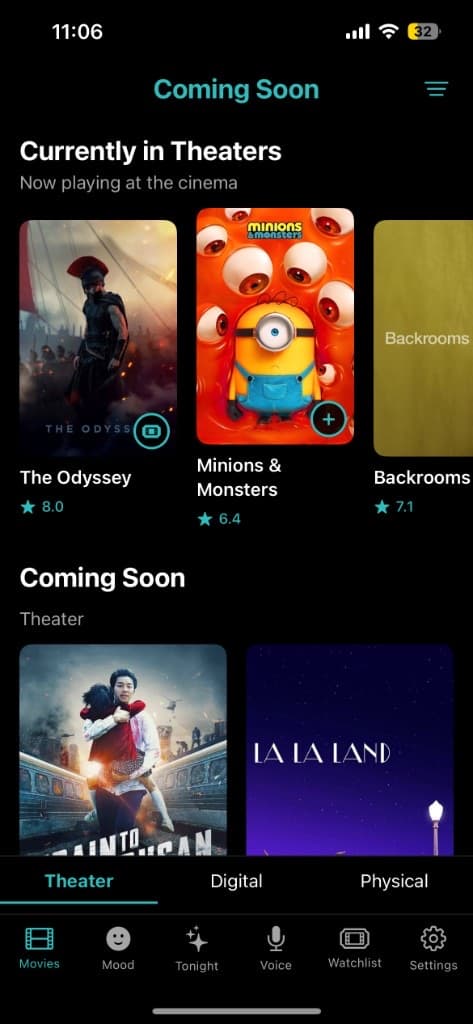
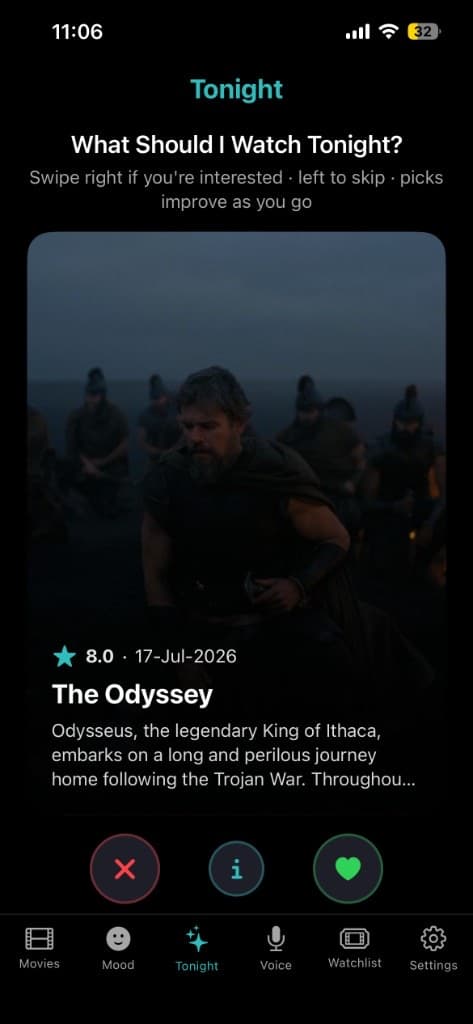
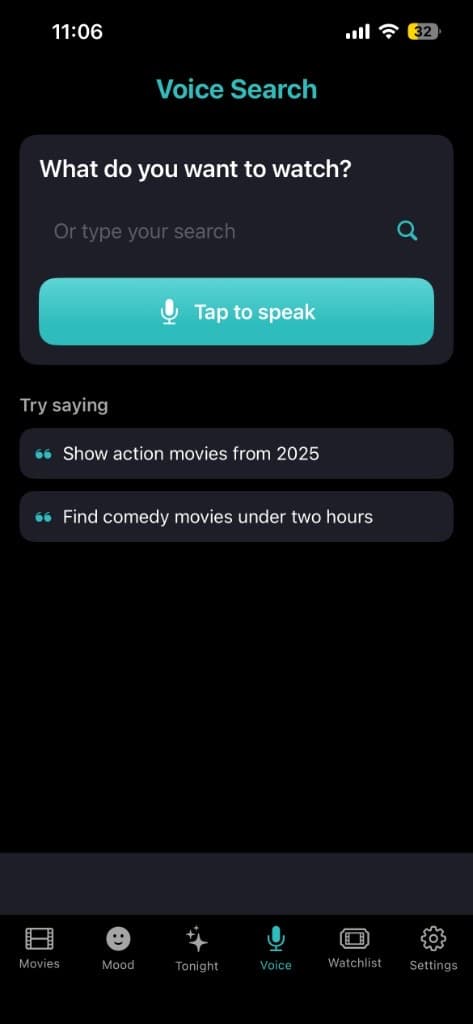
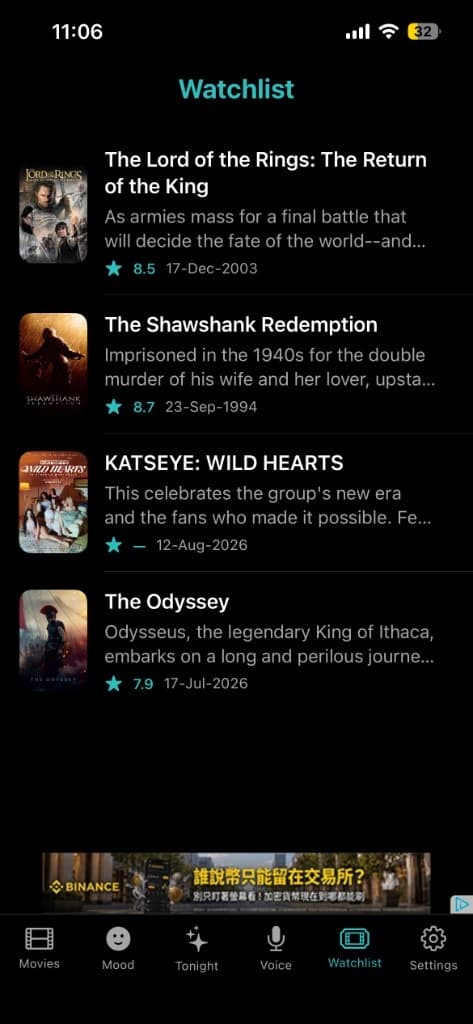
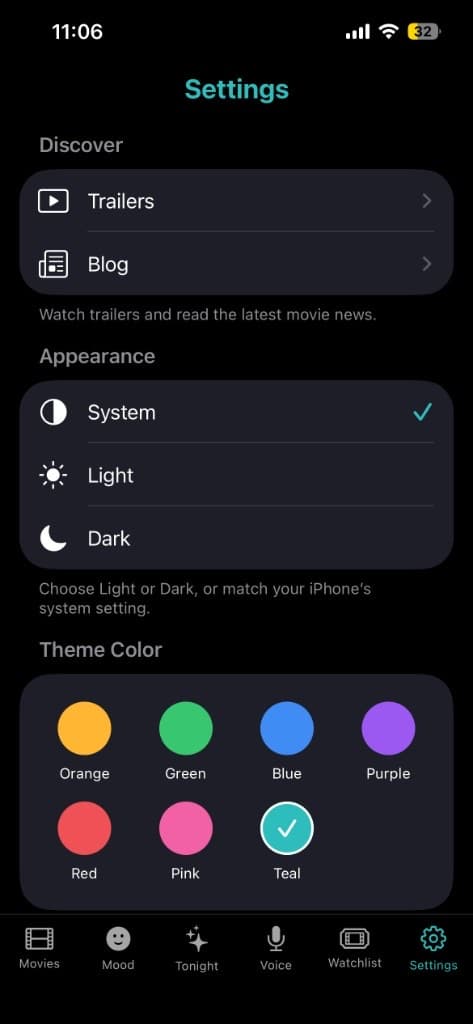
Magazine tour — coming soon / in theaters, Tonight picks, voice search, watchlist, and theme settings.
Overview
Not a static movie database — a feed for what’s new, what’s trending, and what to watch tonight.
Movie fans check for updates constantly — new trailers, release date changes, cast announcements, what’s in theaters — but that information is scattered across social feeds, entertainment sites, ticketing apps, and streaming platforms. No single place brings it together in a way that’s fast to check and easy to browse.
Movie Time was built to be that single place: a film bucket and movie updates app that keeps users current on new releases, trending titles, and “what should I watch tonight?” — designed around how people actually decide, not around dumping an entire static database on the home screen.
The problem
Talking to movie fans and casual moviegoers about how they track film updates surfaced a consistent pattern of friction.
- Release and “now playing” information felt outdated or inconsistent across the sources people relied on
- Discovering what’s trending or newly released meant checking multiple apps or social platforms
- Cast, ratings, trailers, and synopsis were split across sources — extra searching just to decide what to watch
- Many movie apps were cluttered with ads and unrelated chrome that got in the way of “what’s new, what’s good”
Designing Around “What’s New, What’s Now”
Freshness over a static encyclopedia
Fans don’t primarily want another search-only movie database. They want a feed that surfaces what’s changing: new releases, coming soon, and trending picks worth checking often.
Decide without leaving the app
Discovery surfaces and watchlists keep posters, ratings, and saved titles together so “should I watch this?” doesn’t require three more tabs.
Help for the moment of choice
Tonight swipe recommendations and mood-based picking answer the real-world question people open the app for — not only “catalog everything I’ve ever heard of.”
Architecture & tech stack
Movie Time is a SwiftUI iOS client organized around discovery and personal lists. Home and Movies surfaces emphasize coming soon and now-in-theaters freshness; Tonight and mood flows help pick something fast. Watchlists store movie, TV, and anime titles with posters and ratings; history and diary close the loop after watching. Catalog metadata is pulled from a movie database API and cached locally so trending and recently viewed browsing stays responsive without refetching everything on every open. Voice search and theme settings sit alongside the core “what’s new / what to watch” loop.
| Category | Tools / tech |
|---|---|
| Mobile framework | Native iOS (Swift / SwiftUI) |
| Movie data | Movie database API integration for titles, posters, ratings, cast, and release metadata (coming soon / in theaters) |
| Discovery | Coming soon, now in theaters, Tonight swipe picks, and mood-based finder |
| Personal library | Movie, TV, and anime watchlists; watch history, ratings, and film diary |
| Search | Text and voice search for natural-language movie queries |
| Caching | Local caching of recently viewed and trending catalog data for fast repeat browsing |
| Appearance | Theme colors plus Light / Dark / System; Liquid Glass design revamp |
| Distribution | App Store — Movie Time: Film Bucket App (5.0 rating) |
Key features
01
Trending & new release discovery
Coming soon and now-in-theaters surfaces put freshness first, so opening the app regularly actually shows something new.
02
Tonight & mood-based picks
Swipe-style Tonight recommendations and mood-based finding help users decide what to watch without endless scrolling.
03
Watchlists for movies, TV & anime
Saved lists with poster art, ratings, and a film diary so anticipated and watched titles stay in one place.
04
Voice & text search
Natural-language voice search plus typed queries to jump straight to a title when you already know what you want.
05
Fast, ad-light browsing
A clean interface prioritizing discovery and lists over clutter that competes with the core “what’s new” use case.
06
Themes & Liquid Glass polish
Accent themes and Light/Dark/System appearance, refreshed with a Liquid Glass design pass for a modern iOS feel.
Engineering challenges & solutions
Challenge
Keeping movie data fresh without excessive API costs
Solution
Cache trending, coming-soon, and recently viewed catalog data locally and refresh discovery surfaces on a sensible interval instead of live-fetching every title on every screen open.
Challenge
Handling incomplete data for upcoming titles
Solution
Detail and list UI gracefully hide empty sections (missing cast, trailer, or ratings) rather than showing broken placeholders, and re-check metadata as upcoming titles firm up.
Challenge
Helping “what should I watch?” without notification spam
Solution
Lean on in-app Tonight/mood discovery and watchlists for day-to-day decisions; keep alerts selective for meaningful release or follow-ups rather than every minor catalog change.
Challenge
Large poster art without sluggish scrolling
Solution
Optimized image loading for poster grids in watchlists and discovery so browsing stays smooth on typical iPhones while still looking cinematic.
Results
- Published on the App Store as Movie Time: Film Bucket App with a 5.0 rating
- Discovery for coming soon / now in theaters plus Tonight swipe and mood-based picks
- Personal film bucket: movie, TV, and anime watchlists with history, ratings, and diary
- Voice search and theme customization, including a Liquid Glass design revamp
What I’d do differently
- I would invest earlier in personalized recommendations based on followed genres and diary ratings.
- Caching intervals for trending vs coming-soon could be tuned separately for even fresher “what’s hot” without extra API spend.
- Deeper local showtime / ticketing deep-links deserve earlier priority given how often “what’s playing near me” comes up.
Frequently Asked Questions
Where does Movie Time get its movie data from?
Titles, posters, ratings, cast, and release metadata are pulled from a movie database API and kept fresh with local caching for trending and recently viewed browsing.
How does the app keep API costs manageable while keeping data fresh?
By caching discovery and recently viewed catalog data and refreshing on a schedule rather than fetching live data on every individual screen open.
Can users track specific movies they want to watch?
Yes — watchlists for movies, TV, and anime let users save titles with posters and ratings, plus history and a film diary for what they’ve already watched.
Does Movie Time support ticket booking or showtimes?
It surfaces coming soon and now-in-theaters discovery to help you see what’s playing, but it doesn’t currently book tickets — showtime/ticketing deep-links are a natural future addition.
How is Movie Time different from just searching movie updates on Google or social media?
It consolidates new releases, in-theaters discovery, Tonight/mood picks, watchlists, and voice search into one dedicated film-bucket app — so you don’t have to check multiple scattered sources to decide what to watch.
Building a movie discovery or watchlist app people open every night?
Book a free consultation or message on WhatsApp — bring your catalog source, “what to watch” flows, and how you want lists and notifications to feel.
Prefer a quick jump? Start on the ads landing page or return to portfolio.