Transit case study
Poole: A Shared Van Booking App with Real-Time Tracking (UAE)
Shared Van Booking with Real-Time Tracking (UAE)
Role
iOS / mobile engineer — Passenger & Driver apps
Timeline
Built from scratch through production support and hotfixes
Platform
iOS & Android · Passenger App + Driver App
Framework
SwiftUI (iOS) + Firebase
Category
Mobility / Shared Transit
Trip
2 apps
Passenger + Driver
Trip
Live GPS
Firebase fan-out
Trip
UAE
Shared van routes
Live tracking tour
Live map, stop timeline, and driver details for passengers.
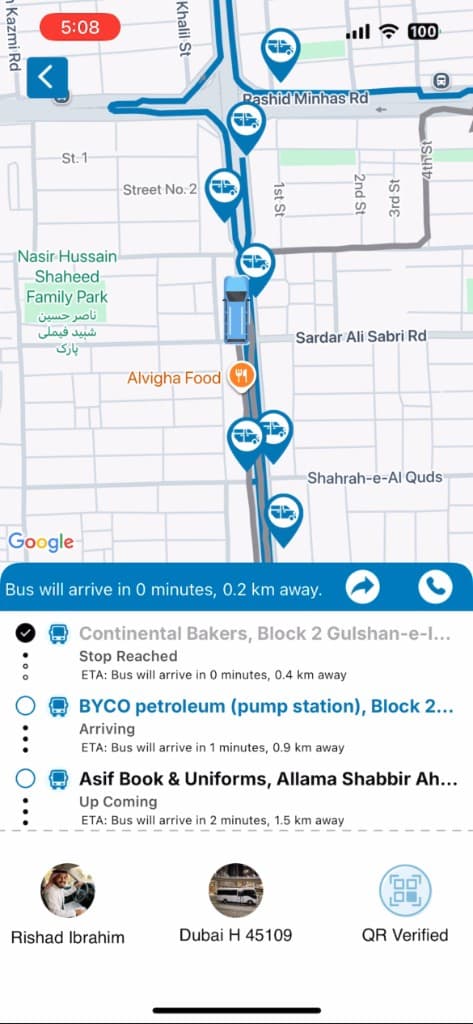
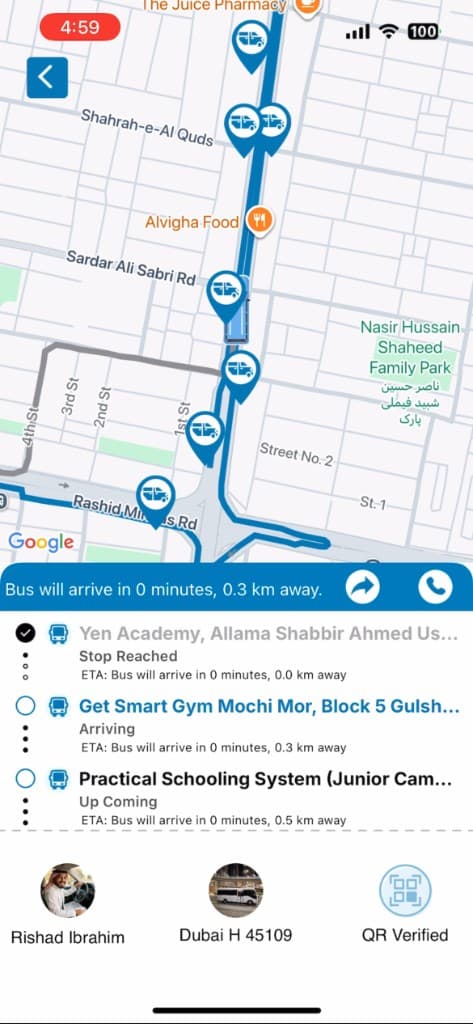
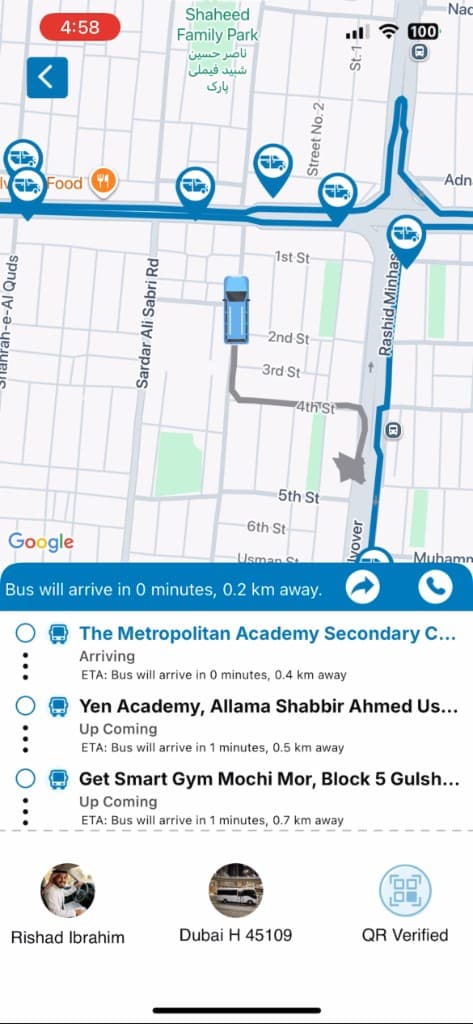
Passenger app — live Google Maps tracking, stop timeline, driver/vehicle card, and QR verification.
Overview
Shared seats on a fixed route — with live van visibility for every passenger on the trip.
Poole is a shared van booking platform built for the UAE market, where a single van with multiple seats runs along a fixed route, and passengers book individual seats rather than an entire vehicle — closer to a shared shuttle than a private ride-hailing trip.
The system is built as two connected apps: a Passenger App for booking seats and tracking the van in real time, and a Driver App for managing the route, passengers, and live location broadcasting, with Firebase powering the real-time layer that ties them together.
The problem
Traditional ride-hailing apps match one rider to one driver, which gets expensive for commuters on predictable, high-traffic UAE corridors. Poole targets shared vans with seat-level booking, multi-stop routes, and live visibility for everyone on the trip.
- Commuters on fixed routes needed a cheaper, shared alternative to solo ride-hailing
- Van operators needed a way to fill multiple seats per trip rather than running near-empty vehicles
- Both riders and drivers needed live visibility into where the van was and how many seats were left
- The system needed to handle multiple passengers with different pickup/drop-off points on the same route
Why a two-app architecture
Stop 01
Different core workflows
Passengers need to browse routes, book seats, and track a van. Drivers need to manage a live queue of pickups/drop-offs and broadcast location — fundamentally different UI and interaction patterns.
Stop 02
Simpler, focused UX
Each app stays lean and purpose-built instead of hiding driver-only or passenger-only features behind role toggles.
Stop 03
Cleaner permission model
Driver apps need continuous background location access; passenger apps don’t. Splitting the apps keeps permissions and battery usage appropriate to each role.
Stop 04
Independent release cycles
Driver-side fixes (e.g. route logic) could ship without forcing an update on every passenger’s device, and vice versa.
Architecture & tech stack
The driver app writes the van’s GPS coordinates to a Firebase Realtime Database node on a short interval. Passenger apps subscribed to that trip listen for location and seat/status changes and update the map marker live, with client-side interpolation so the van moves smoothly between updates instead of jumping.
| Category | Tools / tech |
|---|---|
| Passenger App (iOS) | SwiftUI / Swift |
| Driver App (iOS) | SwiftUI / Swift |
| Android apps | Passenger + Driver apps on the same Firebase real-time contracts as iOS |
| Real-time layer | Firebase Realtime Database — live van location, seat availability, trip status |
| Authentication | Firebase Auth with phone OTP (UAE ride-style signup) |
| Maps & routing | Google Maps SDK — route rendering, live van position, ETA |
| Push notifications | Firebase Cloud Messaging — booking, approaching, and trip updates |
| Backend / API | Firebase-centered backend with Cloud Functions where server rules are needed |
| Payments | Trip booking flows with ops-configurable payment handling for UAE routes |
| CI/CD / release | Production store releases with ongoing hotfix support |
Key features
Pick a route stop — tap to switch.
Route-based seat booking (Passenger App)
Passengers select a route and pick their nearest pickup and drop-off points along that route, then book one or more seats — not a full private vehicle.
Engineering challenges & solutions
Solution
Driver location writes were throttled to a few seconds instead of continuous streaming. Passenger maps interpolate between snapshots so the van still looks fluid while Firebase write volume — and battery cost — stay under control for full shifts.
Results
- Passenger and Driver apps shipped as a dual-app system on a live product site: mypoole.com
- Firebase Realtime Database powers live van location, seat availability, and trip status across apps
- Production support continued after launch with issue resolution and hotfix releases
- Documented as a UAE mobility case study with a companion SwiftUI-focused blog summary
What I’d do differently
- Realtime Database was the right fit for live location fan-out; for heavier historical analytics I would add Firestore (or a warehouse) rather than overloading the live trip nodes.
- I would formalize the seat-transaction rules even earlier — overbooking is the one bug class that destroys trust in a shared-seat product.
- I would keep Passenger and Driver as separate apps at this stage; a unified shell only makes sense later if ops tools and rider tools truly converge.
Riders ask this
Frequently Asked Questions
Tap a route badge — answers open as stop notes.
Route note
Live tracking typically works by having the driver's app periodically send GPS coordinates to a real-time backend (like Firebase), which passenger apps subscribed to that trip listen to and use to update the map in real time.
Building a real-time marketplace, delivery, or booking app?
Message on WhatsApp +974 55179747 or book a free consultation — bring your platforms, roles, and must-have launch features.
Prefer a quick jump? Start on the ads landing page or return to portfolio.